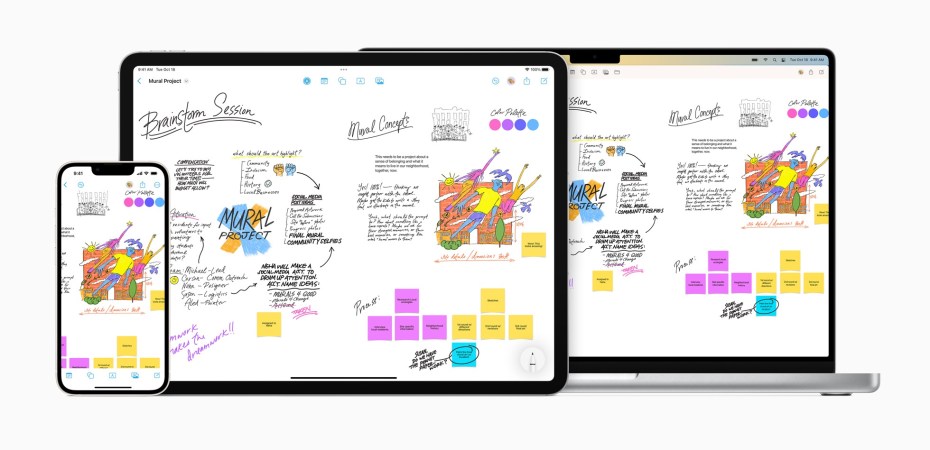
With the release of iOS 16.2, Apple officially introduced the world to Freeform, a powerful visual tool for collaboration, planning, note taking and more.
I’ve been fiddling with Freeform since it first appeared in one of the beta versions of iOS 16 and I prefer it to the Notes app when laying out ideas, taking notes for research, and when a digital notepad is not enough.
The flexibility of Freeform is mind-boggling and was intimidating at first. It lays out like an endless dot pad, the subtle dots give it a hint of structure but the space offers boundless freedom.
I like the toolset on Freeform a lot. It has unlimited flexibility and is compatible with photos, video, audio, documents, PDFs, links to websites and map location links, sticky notes, shapes, diagrams, and more.
It accepts images or scanned doc directly from the iPhone or iPad camera, has a full shapes library, and drag-and-drop content onto the board from other apps it even has alignment guides to keep the layout organised.
I especially like the drawing tools when taking notes and organising data on Freeform. Of course, it works with a finger on an iPhone, but it is so much better with an Apple Pencil on an iPad.
What really makes Freeform useful to even more people is its collaborative tools. According to Apple, up to 100 people can work on a single Freeform board at the same time. It uses the new collaboration features in Messages to invite, share, and keep track of collaborators, including their edits to the board which is listed as messages.
It even has FaceTime so it can be used as a shared whiteboard.
I can imagine, Freeform being used as a post board by a bunch of friends on a trip. By the end of it, they’ll have a visual record of their adventures, interconnected on a single canvas.
While perfect for a casual setting, I feel that Freeform lacks some privacy and security tools that could have made it more useful in more sensitive and critical applications.
It relies on iCloud for storage and security, and the management controls seem basic with limited but sweeping permission settings.
Perhaps I am overthinking it and it doesn’t need those settings.
Freeform is available on iPhones, iPads, and Macs.
 Azizul Rahman Ismail