
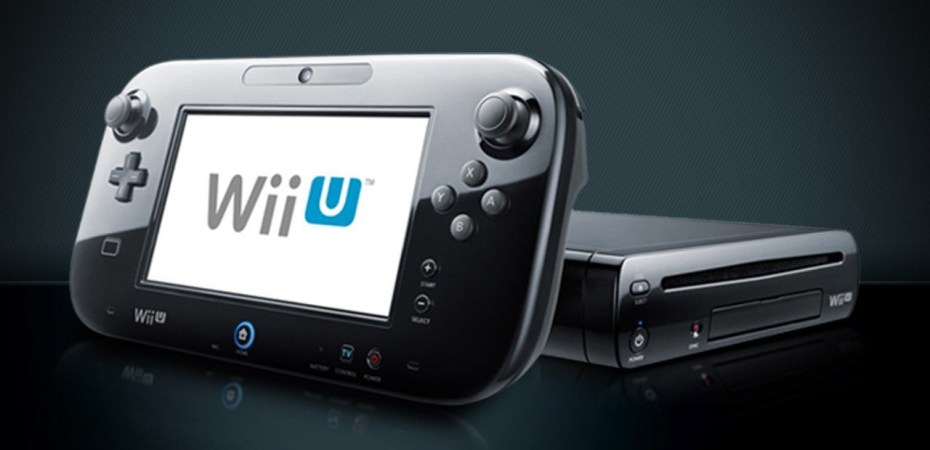
In its relatively short four years and two months, the Nintendo Wii U sold less than its predecessor (Wii), was outshined by its handheld contemporary (3DS), and was quickly replaced by the Nintendo Switch.
Its fall is often attributed to lousy marketing, lack of 3rd party support, and limited capabilities. Still, after over a decade, it is evident that Nintendo put much of its heart and soul into this quirky console, which is worth picking up.
Unique in its capabilities, the Wii U is backwards compatible with the Wii and its motion controllers. A software-modified Wii U can also play almost every game from nearly every Nintendo console before the Wii. Some games can’t be played as intended on other platforms because of their unique controller requirements, such as dual screens and motion controls. So the Wii U is the best way to play them on a TV.
Recently modded, repaired, and upgraded, my Wii U is plugged into my TV and is my primary gaming console. On it, I’ve been playing Super Nintendo, Gamecube, Wii, and Wii U games as my PS4 gathers dust. It made me realise that games by Nintendo and games on Nintendo systems have a charm that is just absent from other console systems.
Modding The Wii U
Modding the Wii U is easy and doesn’t take long. The latest step-by-step guide is available here at https://wiiu.hacks.guide/.
Although not recommended, I suggest updating the Wii U firmware before or after modding the console. This will stop the console and games from nagging for an update. The latest firmware is 5.5.6 for North American consoles and 5.5.5 for all other regions. They are both susceptible to this method, and I’m confident there won’t be any future updates.
NUSspli
Once the mod is done, the first app to install is NUSspli. It is in the HB Appstore. This app downloads and installs games from the now-closed Wii U eShop to a USB drive. It contains games from across Nintendo’s generation of consoles. The library is not complete, but it is good enough.
While most games available can be played using the Wii U gamepad, some Wii games require the Wii Remote (and sometimes the Nunchuck). Some Gamecube games require the analogue triggers on the Gamecube controller to play correctly.
Upgrading The Battery
An often recommended upgrade hardware upgrade for the Wii U is the gamepad’s battery. The standard battery is only 1.5Ah. The upgrade doubles the capacity of the battery to 3Ah. It’s inexpensive and worth the effort.
For most folks, the journey ends here. However, with some effort, the Wii U can do more.
Emulation
Install RetroArch from the HB Appstore to load ROMs from older consoles. Run the app once, and it’ll set up the folders
Find the Details of RetroArch for the Wii U at https://wiki.gbatemp.net/wiki/Retroarch_WiiU.
Find a guide on how to structure the ROM folders at https://gbatemp.net/threads/retroarch-guide-clean-games-collection-faq.468193/.
Better Graphics For Wii Games
Despite being native on the Wii U, Wii games do not look their best on the more powerful console. This is thanks to the filters that are meant for CRT TVs.
The steps to remedy this for Wii games are more involved and require a Wii Remote. First, the Virtual Wii (vWii) in the Wii U has to be modded using the guide at https://wiiu.hacks.guide/#/vwii-modding.
Then install USB Loader GX using the guide at https://wii.guide/usbloadergx.html. In USB Loader GX, go to Global Settings, Loader Settings, and set Deflicker Filter to Off (Extended) and Video Width to Framebuffer.
Because it runs on vWii, USB Loader GX can only load games from a FAT32 formatted USB. But, the Wii U does not like FAT32. So the FAT32 USB drive has to be unplugged when booting up the Wii U. Another way to get around this is to launch straight into vWii from the gamepad instead.
To load Wii games larger than 4GB onto a USB drive, download Wii Backup Manager for the PC. It circumvents FAT32 file size limitations by chopping it up in a way that USBLoader GX can understand. The software can be found here https://wiibackupmanager.co.uk/downloads.html.
Play Gamecube Games With The Wii U Gamepad
Not all Gamecube games are available on NUSspli, and most Gamecube solutions on the Wii U run off of vWii, which does not support the gamepad.
To avoid having to buy new controllers and play Gamecube games using the Wii U gamepad instead, get TechMoon Wii VC Injector for the PC from https://github.com/timefox/TeconMoon-s-WiiVC-Injector-Mod/releases.
Use the app on a PC to create an installer. To make the games look better, go to the Nintendont SD Card Menu and turn on Patch PAL50 and Force Widescreen
Load the generated folder onto the Wii U SD card and install it using WUP Installer, which is a part of the modding process.
Fixing the Wii U Gamepad
A day after I modded my Wii U, my Wii U gamepad wouldn’t charge or start. Modifications do not cause this common problem for long-neglected Wii U gamepads. The easiest fix is to get a new Wii U gamepad motherboard. It’s cheaper than buying a new system or gamepad. It is more straightforward than finding the two surface-mounted fuses on the circuit board.
The motherboard replacement process is intimidating but trivial since the gamepad is built to be repairable.
Remove the battery first.
Here are some of the tips I learned:
The screw hole covers on the back of the gamepad are stickers. I stick them next to the corresponding screw holes for safekeeping.
When opening the gamepad, thin wires connect the IR blaster on the rear cover to the motherboard via a connector. Disconnect that first.
Once opened, take a picture of the connected motherboard as a reminder of how everything goes back together. Many connectors, ribbon cables, and two small daughterboards detach differently.
Ribbon cables tend to have clasps that flip away or towards the cable. No force is needed, and they’ll fit perfectly when reassembled correctly.
The IR LEDs on the new motherboard it to be straightened. Then take off the LED holders (grey plastic) from the old motherboard (to the left and right of the camera and install them on the new motherboard.
 Azizul Rahman Ismail