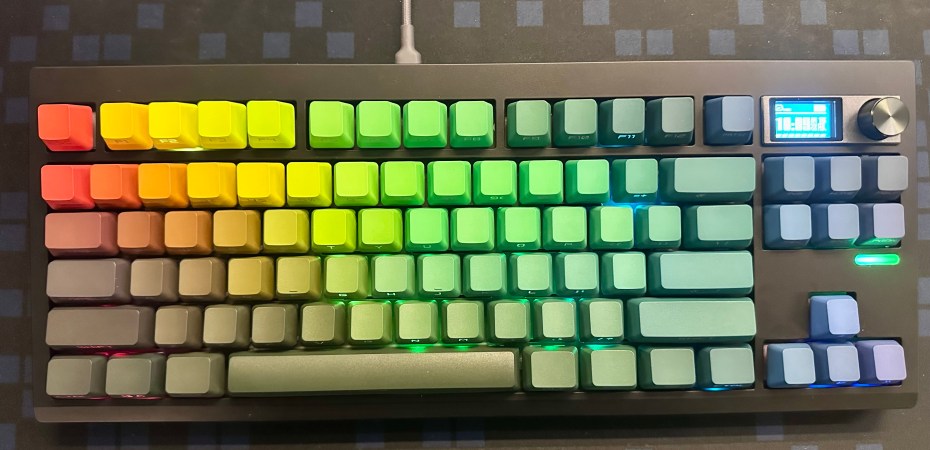
Recently, I assembled my first mechanical keyboard, choosing the popular Zuoya keyboard as my base. I paired it with MMD Princess V5 switches and JKDK shine-through PBT keycaps with an OEM profile, all from Mecha Malaysia, for RM469. Here’s what I learned.
Zuoya keyboards come in four sizes. The full-sized GMK104 offers a complete key layout. The compact 65% GMK67 covers writing and basic navigation. All barebones models cost about RM220. The GMK26, a separate number pad programmable for macros and shortcuts, costs around RM150 barebones.
Given my main focus on editing, I selected the GMK87. While it omits the number pad, it retains most navigation keys and includes a programmable knob and a small built-in display. When the first unit arrived with a dead pixel line, Mecha Malaysia promptly exchanged it.
To make workflow more efficient, I reprogrammed four unused keys (Insert, Page Up, Page Down, and Menu) using VIA, a keyboard remapping tool, as dedicated shortcuts for select all, copy, paste without style, and refresh with clear cache.
However, the board’s VIA implementation—a web-based open-source tool for mechanical keyboards—was buggy. I struggled to get the Ctrl+F5 macro working. Updating the keyboard’s BIOS with a Windows-only tool from the Zuoya website finally resolved the issue.
[UPDATE] The GMK87 is not fully VIA compliant. It cannot do some productivity tricks like Home Row Mod.
Beyond remapping keys, VIA can also customise the keyboard’s backlight. Still, I find the options limited.
Another nuanced feature is the GMK87’s built-in display, which requires a separate Windows-only app to sync with the current time and date and to install custom animations. It would be more convenient if the display could be set without external software, and the knob could be used to switch between dongle, wired, and Bluetooth connections instead.
My experience with the Neo Ergo two years ago, where I selected MMD Princess V3 switches, made choosing the MMD Princess V5 for this build straightforward. Initially, I purchased the Mecha Topography V2 keycap—the only double-shot PBT option with shine-through at the shop. While it felt and sounded excellent, I preferred the JKDK’s look, so Mecha Malaysia let me exchange it and pay the difference.
Once completed, it became clear why Zuoya keyboards are so common despite quality control and software shortcomings. The keyboard sounds and feels like an expensive keyboard when typing. The sound-dampening and mounting are excellent, though the lightweight case feels cheap. A metal version would be a significant upgrade.
For beginner keyboard builders, the typing experience on the Zouya is excellent straight out of the box, with no modifications needed. Enthusiasts will appreciate the potential for customisation, as the board leaves room for upgrades and tinkering. Of the four variants, I would suggest starting with the GMK67 or GMK87L, neither of which has a built-in display. I am also looking at the GMK70, a slit keyboard without a display by Zouya.
[UPDATE] For those who are looking for a keyboard that could boost their productivity, look somewhere else.
That said, there are pre-built keyboards out there that are just as nice but cheaper. Look at the Aula and Ajazz brand as an alternative complete keyboard.
 Azizul Rahman Ismail